Screenshots
This section helps you choose the right capture page in Print Screen Deluxe.
Use it when you want to start a capture, pick the right capture type, or jump to OCR, video, or scheduled capture help.
Start Here
- Read Capture Basics In Print Screen Deluxe for the normal screenshot and recording workflow.
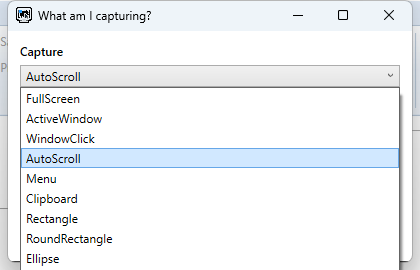
- Read Capture Types Reference when you want help choosing between
Full Screen,Active Window,Window Click,Auto Scroll, and the shape capture choices. - Read Get Text (OCR) for text capture help.
- Read Video Recording for recording details.
- Read Scheduled Capture And Workflow for timed jobs and workflow actions.
Common Capture Jobs
I Want To Take A Normal Screenshot
Start with Capture Basics In Print Screen Deluxe.
I Need To Pick The Right Capture Type
I Want Text From A Capture
Use Get Text (OCR).
I Want To Record Video
Use Video Recording.
I Want A Timed Or Repeating Capture
Use Scheduled Capture And Workflow.
Good To Know
Acquire...from theFiletab is an import path, not a normal screen capture type.Enable Get Textadds a text result after a still-image capture.Capture videochanges the workflow from image capture to recording.
Next Step
Read Capture Basics In Print Screen Deluxe to begin the capture flow.
Then use Edit Images And Add Markup or Save, Copy, And Print when the capture is done.