EZ Macros
🎉 New Version Coming Soon!
Automation for everyone
Record actions, build workflows, and eliminate repetitive tasks — no scripting required. EZ Macros makes automation accessible to anyone who uses Windows.
Fully functional 15‑day trial. One‑time license. Volume discounts available.
Key capabilities
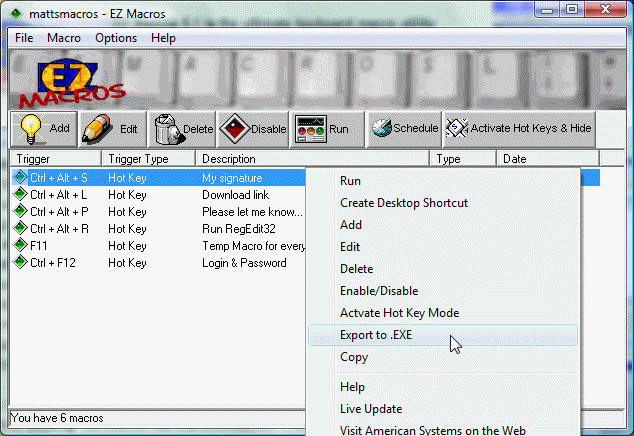
- Record mouse, keyboard, and window actions
- Visual macro editor with drag‑and‑drop steps
- Hotkey, schedule, and event‑based triggers
- Template library for common workflows
- AI‑assisted macro creation (Pro)
- Export/import macros for backup and sharing
Features
Turn repetitive work into one‑click tasks
EZ Macros captures what you already do and turns it into a repeatable workflow. No scripting language. No complicated setup.
Macro recorder
Capture mouse clicks, keystrokes, window changes, and more.
EZ Macros translates your actions into a clear, editable timeline.
Visual macro editor
Rearrange steps, add conditions, insert pauses, and refine your macro visually.
No code — just clear actions.
Smart triggers
Run macros via hotkeys, on a schedule, when an app comes into focus,
or when files change in a folder.
Templates & reuse
Start from templates for renaming files, launching apps, filling forms,
and more. Customize them to fit your workflow.
AI‑assisted macros (Pro)
Describe what you want in plain language, and EZ Macros builds a starting workflow
you can refine.
Built for IT and power users
Export macros, share them with teammates, and manage configurations with
predictable, readable settings.
Why it’s different
Automation without the learning curve
Most automation tools require learning a scripting language. EZ Macros keeps the power but removes the barrier.
- Easier to adopt than scripting tools
- Transparent — you see every step your macro performs
- Ideal for office staff, support teams, and power users
- Works alongside your existing software
"If you're looking for a way to save time and make yourself far more productive, check out EZ Macros. It automates just about any task for you so that your computer does all the work --- not you."
Get started
Try EZ Macros free
Record a few workflows, refine them in the visual editor, and see how much time you can save.